 Board Wars
How to read this rulebook
Rules are numbered by Rule, Section, and Article, so any line in this book can be cited exactly the way the old edition did it — R3:S2:A1 is Rule 3, Section 2, Article 1. The Rule Finder at the back lists every article alphabetically with its reference.
Schedules are the diagrams. Every schedule frame in this edition is a placeholder waiting on updated artwork; the caption in each frame states what it needs to show.
Game Setup
Building the board and assembling teams before the first turn is taken.
BOARD DIMENSIONS
THE GRID
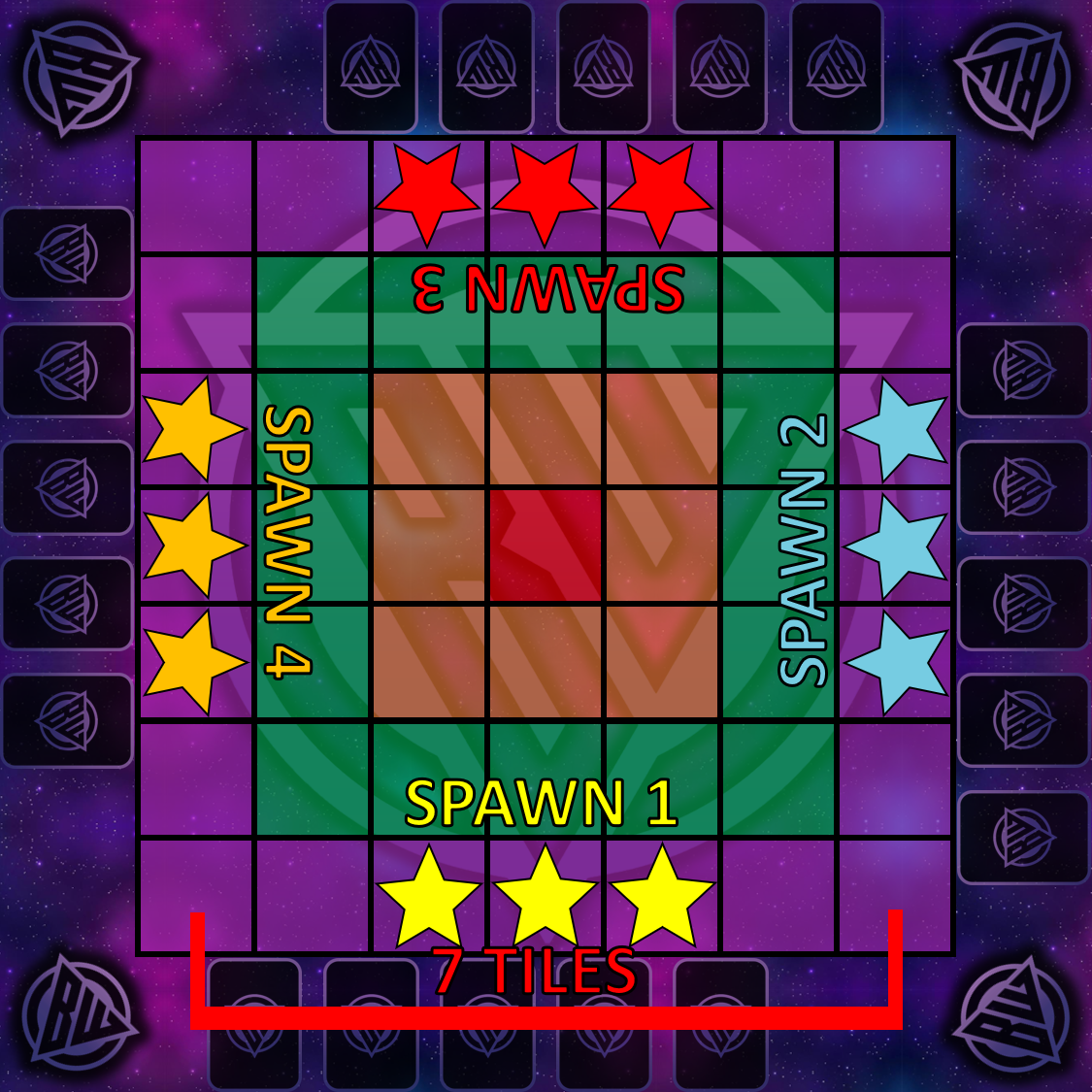
Board Wars must be played on the league-approved 7×7 (49) square grid, as shown in Schedule A. Each square is blank and is bordered by black grid lines that are equivalent in height and length.
On each side of the square grid there must be void “Playspace” of at least a card length long.
THE PLAYSPACE
A Playspace is any part of the board that is not part of the 7×7 tile grid. Your Playspace is the one on your side of the board — it is where you keep your Character Cards and Future Items and Assist Characters…
TILE PLACEMENT
COVERAGE
of the 49 Squares on the grid must be covered with league-approved Tiles. The 12 that remain sit in groups of three on each side of the board and are called Uncovered Tiles, as shown in Schedule A with a star.
UNCOVERED TILES
An Uncovered Tile is a blank 1×1 tile with no effects. It has no suit, no function and no reward, and it grants no Homefield Advantage to anybody.
It does have doorways — they are simply invisible rather than yellow. Characters enter and exit an Uncovered Tile exactly as they would any other Tile.
They are still treated as tiles where it matters in play. Attacking across one costs the tile-to-tile range penalty (R3:S2:A3), and one can be caught by tile-wide damage and transformed into a new tile.
The three Uncovered Tiles in front of a team’s Playspace mark that team’s Spawn. A Spawn is a set of coordinates, not a tile: those three positions stay that team’s spawn point, no matter what tile is later swapped or transformed into them.
SPAWN LAYERS
The board is segmented into 4 Spawn Layers, as shown in Schedule A. Layer 1 is a single tile. Layer 2 is 3 tiles in length and height. Layer 3 is 5 tiles in length and height. Layer 4 is 7 tiles in length and height.
Every tile in the game has assigned layers in which it can spawn.
PLACING THE APOCALYPSE
A single “Apocalypse Tile” must be in play in every game, spawning face-down somewhere in Layer 2.
CONTENT PLACEMENT
CRAFTING TEAMS
Each game of Board Wars is played with 4 teams, each composed of 5 Character Cards. Though cards are randomly assigned, teams are balanced using the GMs discernment.
KEY INFOGRAPHICS
Every player in Board Wars must be able to view key game information at all times. These include the Scoreboard of Health, the Action Clock, the Rotation Counter, and the Dice Roller.
Order of Play
Who sits where, who goes when, and how the game keeps time.
TEAM ASSIGNMENT
ASSIGNING TEAMS
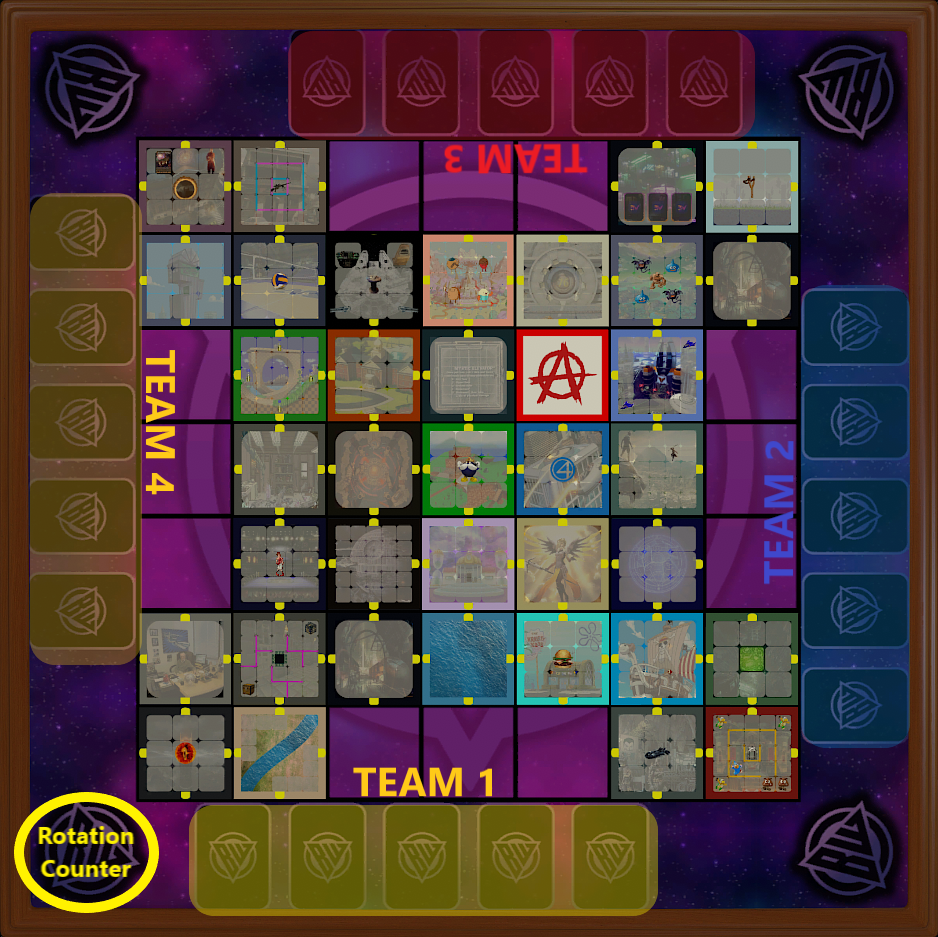
The game begins with each player being seated on each side of the table. The player who views the board from an upright position — meaning the Rotation Counter is in the bottom left from their perspective — becomes labelled as Team 1. Teams 2, 3, and 4 are subsequently labelled in a counter-clockwise formation, as indicated in Schedule B.
THE GM
There is a fifth person, or collection of people, involved in the game, designated as the “GM.” The GM is responsible for making sure the game runs smoothly and is played correctly, controls the CPUs, makes the rolls, and takes the actions of the GM Turn.
TURNS AND ROTATIONS
ROTATIONS
The game is paced in a format called “Rotations.” Every rotation, each team gets a Turn, starting with Team 1 and continuing counter-clockwise until ending with Team 4. After Team 4 finishes their turn, the GM must carry out the GM Turn.
The GM Turn finishing signifies the end of a rotation, at which point the GM updates the Rotation Counter and Team 1 begins the next turn as the start of the next rotation.
THE ROTATION COUNTER
The Rotation Counter sits in the bottom left of the board and increases once all four teams and the GM have taken their turn.
MEASURING AN EFFECT IN TURNS AND ROTATIONS
An effect that lasts any amount of turns or rotations is counted from the moment that created it, not from a fixed point in the round.
PHASES OF A TURN
A team’s turn is composed of three phases, always in this order:
The Start of Your Turn — where certain ability decisions are made. These decisions must happen before anything is done in the turn phase.
Your Turn — where all of your gameplay input happens. Each character can use their Speed and their Action.
The End of Your Turn — where you receive any tile rewards. End-of-turn occurrences may be redeemed in any order.
THE ACTION CLOCK
In professional play there is an Action Clock run by the GM. A player has 2 minutes from the start of their turn. Each action performed by a character extends the clock by 30 seconds, and each action performed by a non-character extends it by 15 seconds.
Your turn ends when you run out of time or when you declare your turn is over. A player may choose to end their turn before using all of their actions.
TIME-OUTS
ALLOTMENT
Each player starts the game with 3 time-outs. Every time-out lasts 2 minutes.
Calling a time-out always spends one from your allotment. There is no exception to this.
CALLING A TIME-OUT
A time-out is called by saying or typing into the game chat, “Time-Out”. This can happen at any time, including during another time-out.
OVERLAPPING TIME-OUTS
A time-out may be called during another time-out. Doing so still costs the caller one of their three — interrupting is not free.
When the interrupting time-out ends, the time-out it interrupted resumes with whatever remained of its 2 minutes, and its caller directs the floor again.
DURING A TIME-OUT
All game functions and mechanics are paused during a time-out. Players may use the time to speak, but the player who called the time-out has the power to ask someone to speak or to mute someone. Conversation moves as the calling player dictates.
If the calling player wishes to mute another player, that player is server muted by the GM for the duration of the time-out. A muted player is also not permitted to type in the game chat, with one exception: they may type to call a time-out of their own.
Character Functions
Reading a card, using its stats, and everything that happens when you attack.
UNDERSTANDING CARDS
READING A CARD
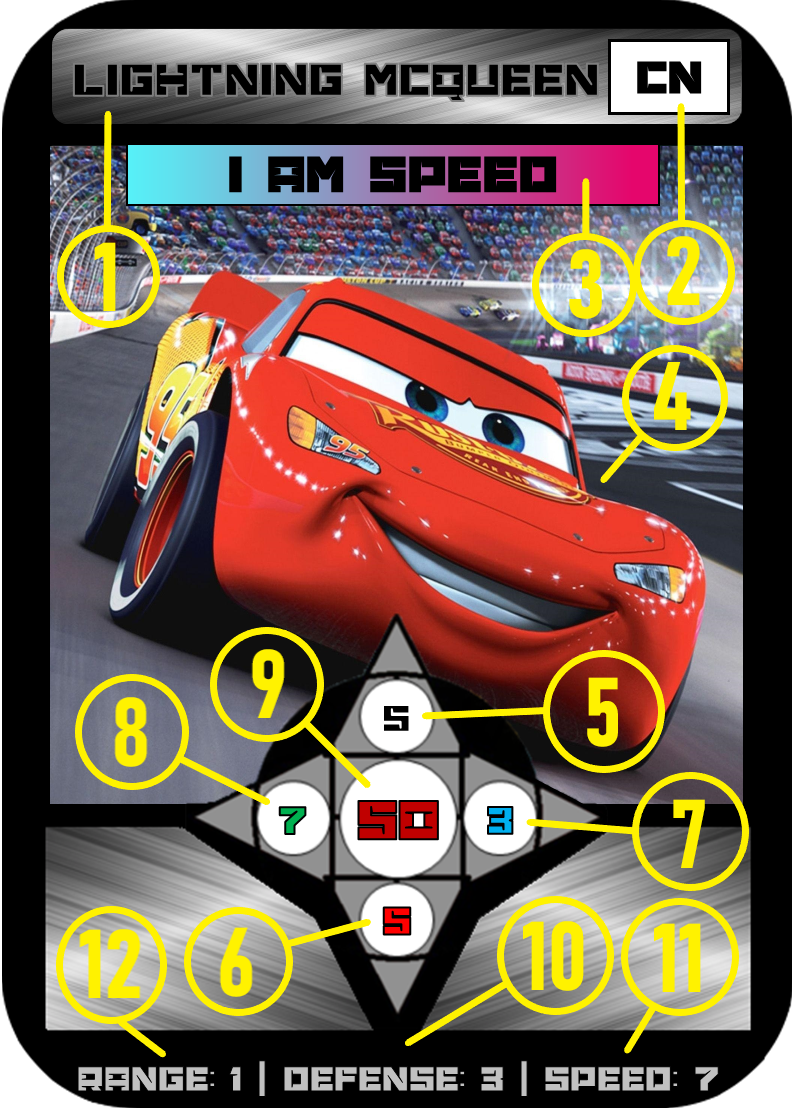
This article is numerically guided by the Schedule C reference. Each number identifies a component of the card:
The name of your character.
The Suit your card belongs to — the media it originates from.
Your character’s Ability.
A portrait of your character for visual aid.
Your Base Attack, at the top of the attack star — what your normal attack would be.
Your Red Attack, at the bottom of the star — your attack while your health is at 50% or lower.
Your Blue Attack, at the right of the star — your attack while under a negative effect.
Your Green Attack, at the left of the star — your attack while under a positive effect.
Your maximum Health Points, in the center of the star.
Your Defense.
Your Speed.
Your Range.
CARD RARITIES
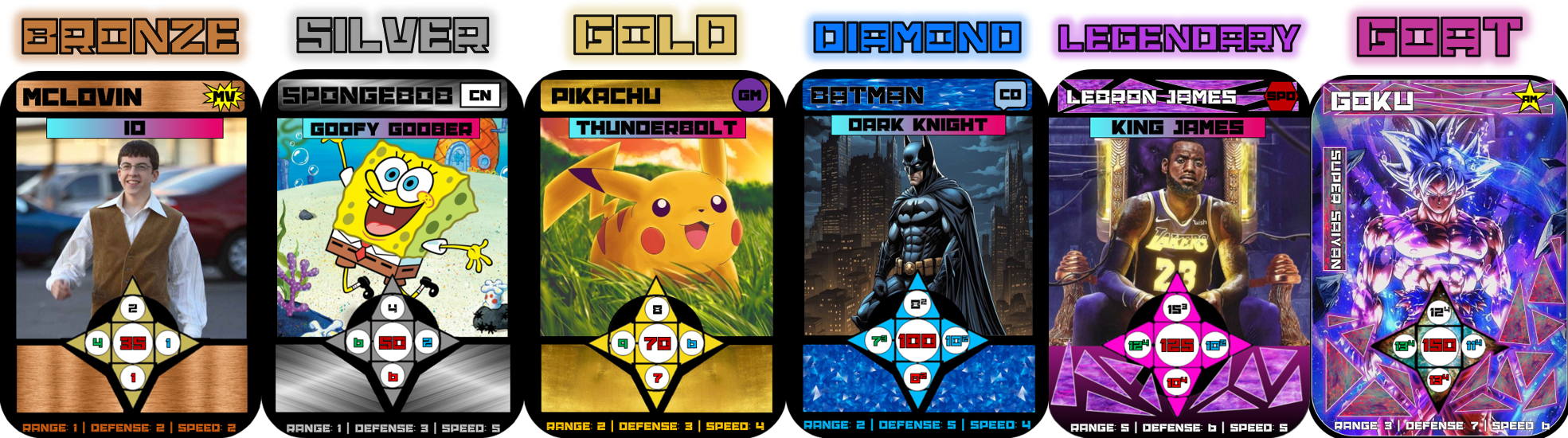
There are 6 Card Rarities in Board Wars. Schedule D lists them from left to right in order from least to most powerful: Bronze, Silver, Gold, Diamond, Legendary, and GOAT Series.
Rarity communicates statistical power and nothing else. It has no bearing on whether a card has an Ability — every card in the game has one, at every rarity.
CARD AND TILE SUITS
There are 12 different Suits that a card or a tile could possess. Suits are categories that explain the origin of the media that thing belongs to. A character standing in a tile of their own suit gains Homefield Advantage (R3:S2:A8).
| CODE | SUIT | CODE | SUIT |
|---|---|---|---|
| AM | Anime | GM | Game |
| CN | Cartoon | I | Icon Series |
| CO | Comic Book | IRL | Real Life |
| CS | Champ Series | LY | Legacy |
| G | Gadssle | MV | Movie or TV |
| SPO | Sports | YT | YouTube |
ABILITIES
Every character in Board Wars has their own unique Ability. There is no card without one, and a card’s rarity has no bearing on it. This ability will grant the user their own unique functions that can be performed only during their turn unless specified otherwise.
Abilities are listed at the top of the card’s portrait, in a blue and pink textbox. Every ability belongs to one of the 11 ability types set out in the Ability Index.
UNDERSTANDING STATS
CHARACTER MOVEMENT
Each character has a unique Speed stat. Speed determines how far a character can move each turn. There are four speed rules:
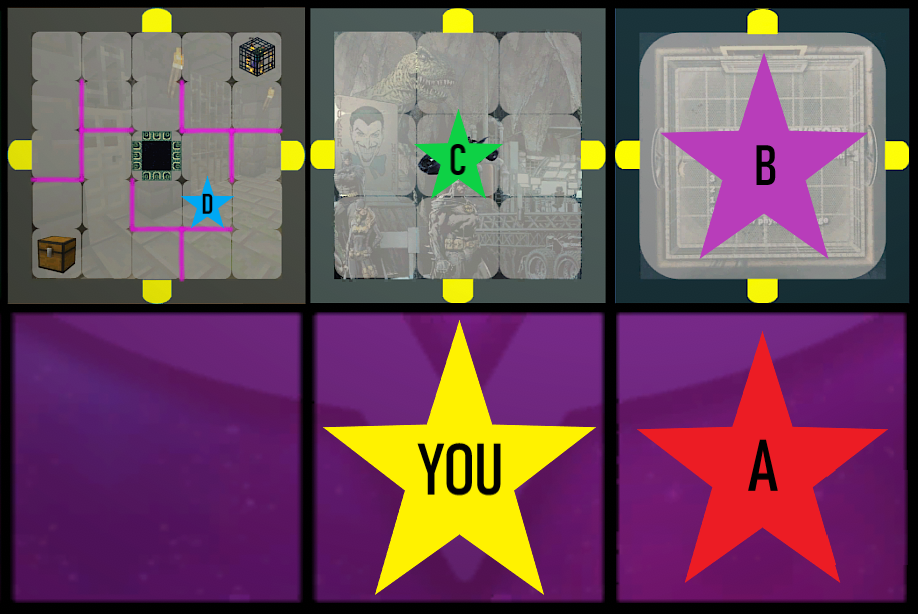
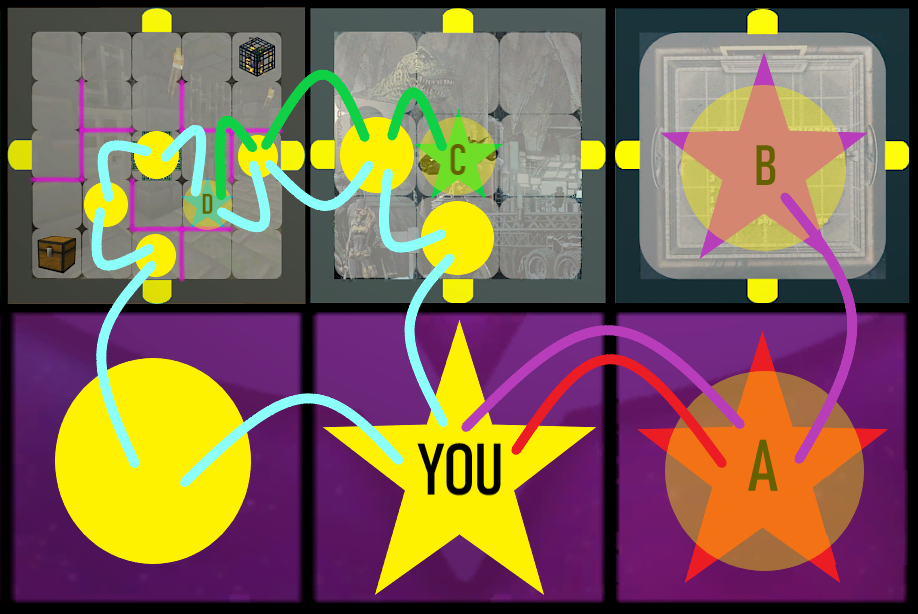
- It costs 1 speed to move onto an adjacent space. Speed is always spent per space, never per tile.
If YOU were to move to Destination A it would cost 1 Speed.
- Crossing into a new tile is no exception — you are still moving one space at a time, and a single-space tile costs 1 speed to enter like any other space.
- You can only enter and exit a tile through its connected doorways, which means you cannot travel between two tiles diagonally.
- You can move diagonally, but only between spaces inside the same tile.
USING SPEED
Each turn, each character can only use as much speed as their stat shows on their character card. A character is not required to use all of their speed.
Stats are not fixed. Speed, and every other stat, can be changed by items, abilities, and tiles. Changes from items and abilities are usually temporary, and anything of that kind which alters a stat permanently will say so. Stat increases given by a tile are permanent unless specified otherwise (R4:S2:A6).
RANGE OF ATTACK
Each character has a unique Range stat. Range determines how close you need to be in order to attack an enemy. There are three range rules:
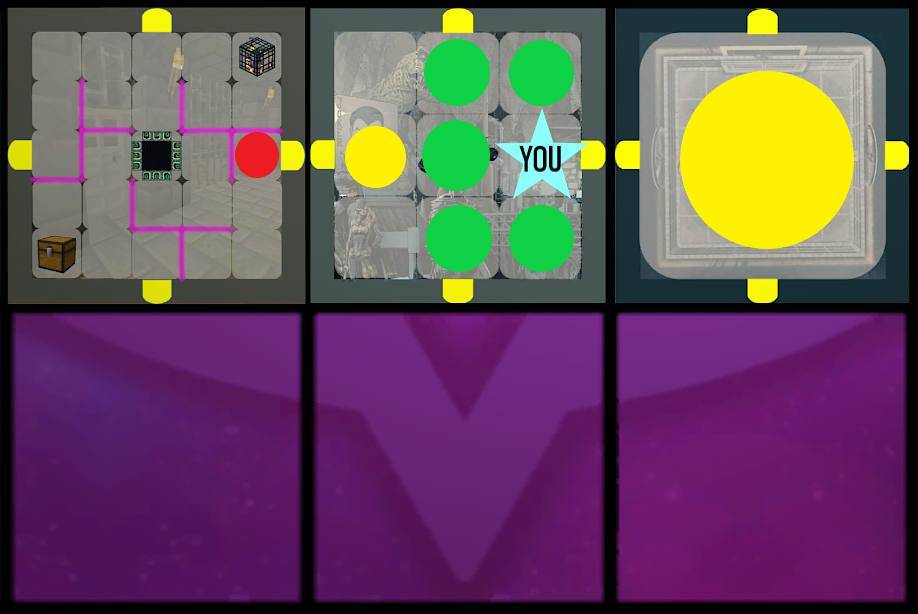
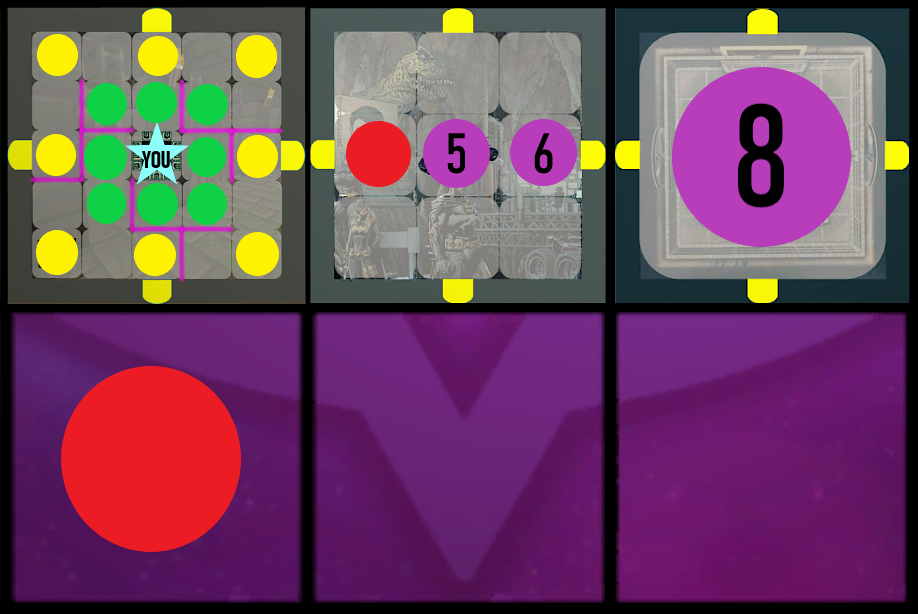
- It only costs 1 range to attack an enemy on an adjacent space.
Green circles cost 1 Range, Yellow costs 2, and Red costs 4.
- You can only attack enemies that are in your Line of Sight (LOS) — if you cannot draw a straight line from yourself to them, you cannot attack them.
- It costs an extra range as a penalty when attacking across tiles, and an extra range when attacking over a body of water.
LINE OF SIGHT
Line of sight is simply a straight line being drawn. It is achieved whenever that line can be drawn from one point to the other. Within a single tile that line may be diagonal.
From one tile into another, a diagonal is obstructed by the tiles’ doorways. There is no diagonal line of sight between two tiles.
Line of sight can also be carried across the board through a portal (R4:S5:A4).
HEALTH, HEALING AND SHIELD
Max Health is the maximum amount of health a character can have and the amount they begin the game with. Health is reduced by suffering damage. Health is not considered a stat.
Healing increases current health towards, and up to, its maximum value. Shield is healing that is allowed to go beyond maximum health.
THE ATTACK STAR AND ITS PRIORITY
The attack star is what tells you which of your attack stats to use when an attack is initiated. Which point of the star applies depends on the circumstances the attacking character is in at that moment.
Base is the default. Red is used at 50 percent health or lower. Blue is used while de-buffed. Green is used while under a positive effect, and anything that causes green attack will specify.
No colour is inherently stronger or weaker than another. A colour change is not a buff or a nerf in itself — it only selects a different number, and whether that number is higher or lower than your base is decided by the card. Some characters hit harder when wounded; others hit softer.
A colour change can also change your Dice Tier, since the tier is printed on each point of the star individually (R3:S3:A4).
If a character meets the conditions for more than one colour at once, the highest priority wins. From lowest to highest the order is base, red, blue, green — green always wins.
BUFFS AND DE-BUFFS
A buff is an increase to a stat, and can come from abilities, items, and tiles. A de-buff is a negative effect placed on a character.
How long a buff lasts depends on where it came from. A stat from an item lasts as long as that item is held and active. A stat from an ability lasts as long as that ability specifies. A buff given by a tile is permanent unless specified otherwise (R4:S2:A6).
HOMEFIELD ADVANTAGE
Every tile has a suit. When a character’s suit matches the suit of the tile they are in, they gain the Homefield Advantage Buff for as long as they remain in that tile. It goes away the moment they leave.
Homefield Advantage is the only temporary benefit a tile confers. All other buffs a tile gives are permanent unless specified otherwise, and keep working after you leave (R4:S2:A6).
Each character draws homefield advantage from their own tile, not from the tile the attack is aimed at. When an attacker and a defender stand in two different tiles, both are checked against their own tile, and either, both, or neither may hold the advantage.
If only the attacker holds it, they attack with green. If only the defender holds it, the attacker is cursed to attack with blue. If both hold it, the two cancel out — neither green nor blue is given, and the attack proceeds on the attacker’s normal stat.
DEFENSE AND THE DEFENSE LIMIT
The Defense stat represents how difficult it is to land an attack on a character. The maximum defense a character can achieve is 9 — at that ceiling only a rolled 12 will land a hit.
ATTACK RULES
HOW TO ATTACK
To initiate an attack, the defender must be within both the range and the line of sight of the attacker. You attack an entity by spending the attacking character’s action.
Multiple of your characters can choose to attack the same target at once, this is called a “Group Attack”. One character cannot naturally choose to attack multiple targets.
DURING THE ATTACK
Once an attack has started, there is no going back.
"When performing an Attack. The Defender Rolls as Many ""Defense Dice"", as your Attack Indicates with the Large Number. If any of the Dices Value Exceed their ""Defense Threshold"", those Attacks Land a Hit.
Next, the Attacker Rolls a ""Damage Dice"" for Each Attack that Hit, the Strength of these Dice are Determined by the ""Dice Tier"".
The Total Value of the Rolled Damage Dice, is Exactly how Much Damage the Defender Suffers.
THE DEFENSE DICE
A Defense Dice will always be a D-12.
If what you roll is equal to or less than your defense stat plus 2, the attack misses and you take no damage from that roll. If the roll is more than your defense stat plus 2, that attack is considered a Hit. This is resolved for each individual dice.
THE DAMAGE DICE AND DICE TIERS
You roll the Damage Dice as many times as your Attack Hit. Not all damage dice are created equal — there are 4 Dice Tiers, expressed as an exponent on the attack star.
A card can carry a different tier on each of its four attack values, so changing which colour you attack with can change the die you roll as well as the number of attacks you throw. A value printed with no exponent is Tier 1.
| DICE TIER | DAMAGE DICE | AVERAGE DAMAGE PER HIT |
|---|---|---|
| N | D-6 | 3.5 |
| N² | D-12 | 6.5 |
| N³ | D-20 | 10.5 |
| N⁴ | D-20 (+6) | 16.5 |
ATTACK EXAMPLE
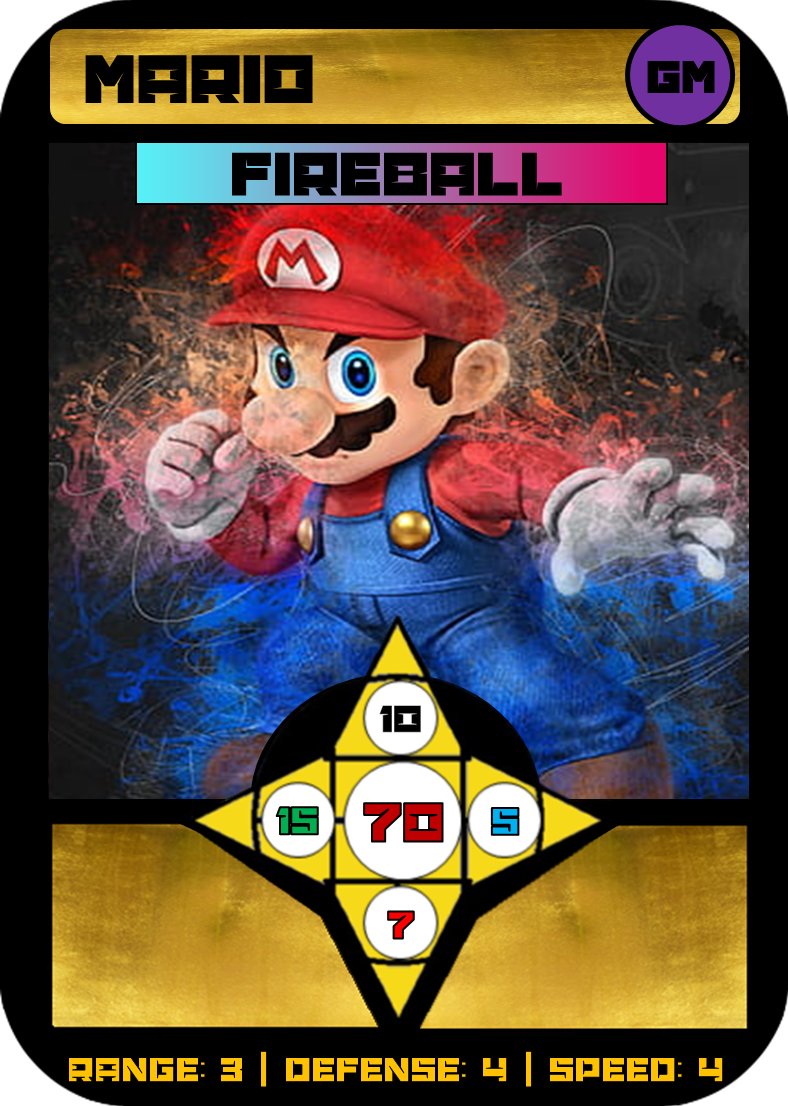
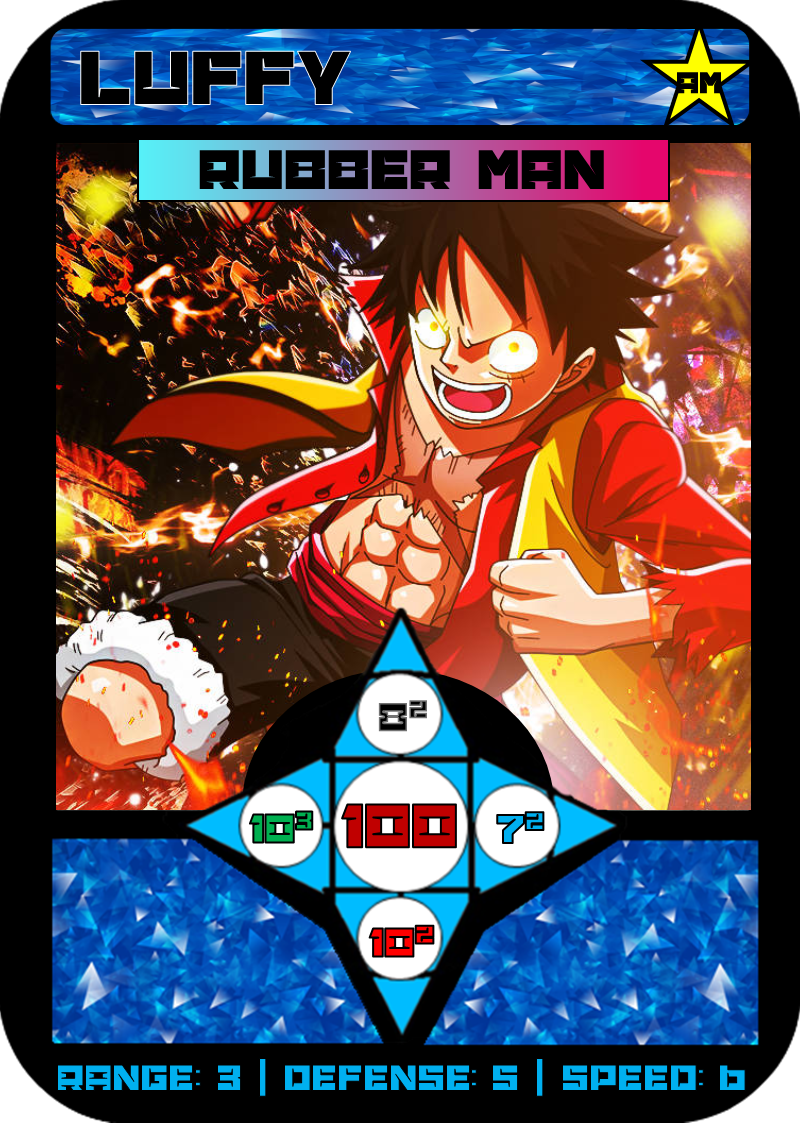
If Luffy (Schedule J) were to attack Mario (Schedule I), Luffy would throw 8 attacks using his base attack of 8². Mario defends each one on a defense dice, and with a defense of 4 his threshold is 6 — so anything from 1 to 6 is a dodge.
That is a 50% dodge rate, so on average 4 of the 8 attacks hit. Luffy’s base attack is Dice Tier 2, meaning each hit rolls a D-12 for an average of 6.5 damage. Mario suffers roughly 26 damage.
Entity Terminology
ENTITY
Entity is the broadest term in these rules. It covers characters, assist characters, minions and CPUs alike, on any team or on no team at all.
Wherever a rule says anyone, it means every entity. Where a rule instead names something narrower — a character, an opponent, a minion — only that narrower group is meant.
TEAMMATE
A Teammate refers to a Character that is on your Team.
OPPONENTS AND ENEMIES
An Enemy, is a character on an enemy team. An Opponent is any attackable entity that is not on your team — enemies, assist characters, minions, and CPUs alike.
MULTI-CHARACTER CARDS
A multi-character card spawns multiple characters instead of one. Every character attached to the card must be Killed before the card is considered dead.
Each character on the card draws from the same stats, but spends them separately. Every one of them has their own action, their own health pool, their own speed to spend, and their own tile reward ticks.
They share one stat pool and one item pool. A stat buff gained by one of them is gained by all of them, and any item that grants its effect simply by being held, applies to all of them. An item that is used up is applied only to the individual character who used it. Any one of them may drop or pick up items, thereby adding or subtracting to their pool.
ASSIST CHARACTERS
An Assist Character is a temporary ally that you control but that is not considered part of your team. You can only have 1 assist character at a time.
MINIONS
A Minion is an entity spawned by a character’s ability and controlled by that character’s team. Minions are spawned on any space within both the range and the line of sight of their creator, and all of a character’s minions disappear if that character is killed. Minions cannot receive tile rewards unless specified.
Unless specified otherwise: minions cannot drop or trade items; minions can make use of any and all items held by their creator; and when a minion picks up an item, that item is added to the creator’s item pool.
A minion cannot pick up an item at all if there is no slot available for it.
CLONES
A Clone is a direct copy of a character’s stats and abilities. A clone is created on the same space as the character it copies.
Items are not cloned. A clone is created holding nothing, no matter what the original character was carrying at the time.
A clone has only 1 HP and is treated as a minion. The Clone dies when the character it was copied from dies.
CPUS
A CPU is an opponent with no affiliation to any team. CPUs sometimes populate the board, are controlled by the GM, and may have stats or effects specified by the tile or the cause that produced them.
Unless specified otherwise, a CPU can be attacked, may have a defense stat, and can be harmed as though it were a normal character. Not every CPU has an attack listed.
A CPU that has an attack listed always retaliates. If it survives an attack made against it, it immediately attacks back at the character who attacked it. Retaliation is not optional and costs the CPU nothing — it happens every time, unless specified otherwise.
Retaliation ignores positioning entirely. It makes no difference how far away the attacker stands, whether the CPU has a range of its own, or whether line of sight exists between them — the CPU strikes back at whoever attacked it, wherever they are.
Where a CPU has a range or a speed of its own, those govern what it does on the GM Turn. They place no limit on retaliation.
A CPU with no attack listed never retaliates, and a CPU defeated by the attack does not retaliate either. Outside of retaliating, CPUs act on the GM Turn, using their speed where they have one.
Gameplay
Tiles, items, water and vehicles — everything you interact with once the game is running.
GENERAL PLAY
SPAWNING YOUR TEAM
At the beginning of your first turn, your entire team must be placed into your Spawn. All five characters go down at once, before anything else in that turn happens, and placing them costs no speed and no actions.
You may distribute your characters across the three Uncovered Tiles of your Spawn however you like — separately, together, or in any combination. There is no requirement to spread them out, and no limit on how many may share a single spawn tile.
Once your team is placed, the rest of your first turn proceeds as normal.
ACTIONS
Every character has 1 action every turn (unless otherwise specified). Actions are used to attack, use tiles, use items, or to interact with abilities.
Each character only naturally receives 1 action each turn, and actions cannot naturally be traded or lent from one of your characters to another.
COMPONENTS
A Component is a checker piece that sits on the board. Components are used to represent certain objects, and to track progress towards things such as tile reward ticks (R4:S2:A5).
Components travel with the Tile beneath them. When a tile is moved onto the Uncovered Tile a Component stands on, that Component is carried into the arriving tile (R4:S2:A10).
SUMMONS
A Summon is when a random 6th character card joins your team. Each team is allowed 1 summon per game, and it is usually achieved as a tile reward.
DEFEAT AND KILLS
Both Defeat and Kill refer to the Instance when one causes Entities Health Points to Reach 0. This Act causes them to Die and Removes them from the Game.
Where they differ, is “Defeat” Specifically refers to the Death of a Non-Character from the game.
While “Kill” Specifically refers to the Death of a Character from the game.
A character removed this way returns only through a Revive (R4:S1:A6).
When a character dies, their items drop exactly where they were standing (R4:S3:A3), and unless specified otherwise all effects of that character’s abilities cease. All of that character’s minions disappear.
REVIVING
A Revive is when a character who has died comes back to life.
A revive is caused by an ability or a tile that specifies one. Nothing else brings a character back.
The player may choose whether the revive occurs at the point of occurrence, or back in the team’s Spawn (R1:S2:A2).
A revived character returns at full health, with their ability and their stats in exactly the state they were in at the moment of death.
Health is the only thing a revive restores. Ability charges spent while the character was alive remain spent, any points or resources their ability had accumulated do not return, and whatever buffs or de-buffs sat on their stats when they died sit on them still.
Items are not restored either. Whatever the character dropped on death stays where it fell (R4:S3:A3), and a revived character recovers it only by picking it up again.
USING TILES
TILE VARIATIONS
The tiles that populate the board come in various shapes, sizes and functions. Every tile has its own use, and some their own set of rules. Four components make them generally unique:
- Size — a tile is a collection of spaces, and can be a 1×1, 3×3, or 5×5 space grid. The Space, not the tile, is the fundamental unit of movement, range, and line of sight.
- Homefield — every tile has a suit, and a character matching it gains the Homefield Advantage Buff (R3:S2:A8) for as long as they stand there. It is the one temporary thing a tile gives.
- Spawn — every tile has a specific layer it can naturally spawn in (R1:S2:A3).
- Function — most tiles offer unique rewards for spending time there, defeating bosses, using actions, or sacrificing specific items. This is the primary way characters gain items.
YELLOW DOORWAYS
Tiles can only be entered and exited through their connected doorways. On every league-approved tile those doorways are yellow.
Uncovered Tiles have doorways of their own, but theirs are invisible rather than yellow (R1:S2:A2). They work identically for movement, and are out of reach of anything written to act on yellow doorways specifically.
TILE WALLS
Tile walls are pink lines inside a tile. They obstruct movement but allow attacks through.
TILE REWARDS
A Tile Reward is a reward a character gets by ending their turn in a tile. Some rewards are not granted immediately, and instead require several turns in a row, of ending a turn, in the same tile.
TILE TICKS
Progress towards a tile reward is tracked with Ticks, counted separately for each character.
Ticks are spent at the end of your turn in the relevant tile. The reward’s price in ticks disappears in exchange for the reward itself.
Redeeming a reward removes only the number of ticks that reward costs. Any ticks a character has banked beyond that price stay with them.
All of a character’s ticks in a tile disappear at once if they interrupt the string of consecutive turns ended in that tile. This is always true unless specified otherwise.
PERMANENCE OF TILE REWARDS
All buffs a tile gives you are permanent. So is everything else a tile grants — rewards, items, and stat increases alike. None of it expires, and none of it is lost if that tile is later deactivated, swapped, or removed from the board.
Once a reward has been redeemed it is severed from the tile that produced it, and the state of that tile afterwards has no bearing on what you already hold.
TILE ECONOMY
Aside from Tile Rewards, other Nonphysical resources can also be gained through a Tile’s native economy system. Any intangible spending power gained from a Tile can be used by any member of your team.
TILE INTERACTABLES
Interactables are portions of a tile that can be interacted with by spending an action, from within 1 range of the interactable piece. An interactable may be a piece of the tile, such as the slingshot in Bird Island, or the tile itself, such as the Mystic Elevator.
TILE RADIUS
Tile Radius refers to an Area of Square Tiles on the Board, in either a 3×3 or 5×5 area. The rule that uses this term will specify which.
TILE SWAP
Certain abilities, items and effects can swap tiles. When this happens the tile and everything in it remain unchanged; the two tiles trade positions on the board while eeping their orientation.
When the destination already holds a tile, the two swap places.
When the destination is an Uncovered Tile (R1:S2:A2), there is nothing to swap with. The moving tile simply moves onto it and covers it up.
When a tile lands and stops on an Uncovered Tile, every entity and Component standing on that Uncovered Tile is picked up and placed into the tile that has arrived over them.
CONSOLIDATION
Consolidation is how the contents of a tile are placed when they end up in a tile of a different size. It applies when entities and Components are carried into an arriving tile, and equally when a tile is transformed into a bigger or smaller one.
Contents always settle into the concentric center of the new tile, keeping their positions relative to one another.
A 1x1 Tile, entering a larger tile lands in the middle space of that tile.
A 3×3 entering a 5×5 keeps its coordinates, mapped onto the middle 3×3 of the larger tile, so nothing inside it shifts relative to anything else.
A 5×5 becoming a 3×3 folds inward instead. The larger tile divides into nine regions laid out exactly like the smaller tile, and everything standing in a region moves to the single space that region corresponds to.
The middle space goes to the middle space of the 3×3. Each 2×2 corner block goes to the one-space corner nearest it. The spaces running along the edges between those corners go to the edge spaces of the 3×3.
DEACTIVATING A TILE
When a tile is deactivated, all functionality of that tile is paused until the deactivation is removed.
Rewards and stats it has already granted are untouched (R4:S2:A6).
TRANSFORMING A TILE
Transforming a tile will result in an existing tile on the board being transformed into a chosen tile that is not already in play. A Tile that is Transformed will have its functionality suspended unless it re-enters the board.
CONDITIONAL TILES
Certain tiles in the game can only be spawned onto the board through specific means. These tiles include Apocalypse tiles, and tiles that are spawned in by the Apocalypse, Character abilities, or other tiles. These tiles cannot enter the game through any means except by their specific trigger.
TILE-WIDE DAMAGE AND ATTACKS
Tile-Wide Damage is flat damage dealt to a single tile or a collection of tiles, and it applies immediately to everything in the affected tiles. Flat damage applies straight to a health pool and is not affected by defense.
A Tile-Wide Attack is an attack that rolls against every opponent in the attacker’s tile.
ITEMS
GAINING ITEMS
Items are gained primarily through tiles, as a way to reward the player for completing tasks. Items vary in quality but are generally intended to make your character stronger.
USING ITEMS
When an item is gained or picked up, it cannot be used immediately. A character must End their Turn with an Item in order to use it. Some items also cost that character’s action, or require external conditions, to use.
A character can only hold up to 2 items at a time. Multi-Character Cards share one item pool, so any item that grants its effect simply by being held, applies to all of them. An item that is used up is applied only to the individual character who used it. Any one of them may drop or pick up items, thereby adding or subtracting to their pool. (R3:S4:A4)
DROPPING AND PICKING UP ITEMS
A character can drop any held item onto their current space, and can pick up any item in a space within 1 range of their current space. Both may only be done on your own turn.
When a character dies, their items drop exactly where they were standing when they died. Those items can be picked up under the same rule as any other — from within 1 range.
ITEM VALUE
Items are denoted with a value in the top-right corner of the card. These values are used in specified instances.
ITEM TYPES
Aside from having a value, every item belongs to one of seven types:
| TYPE | HOW IT WORKS |
|---|---|
| Spell | Something you can use your action to do, but then must discard. |
| Tool | Something you can choose to use your action to do, and can keep. |
| Weapon | Something you can attack through. |
| Buff | Grants a temporary stat increase while you hold the item. |
| Power | Gives the character holding it special abilities. |
| Consumable | Something you can choose to use without an action, but then must discard. |
| Conditional | Has a set of requirements that must be met in order to use it. |
WATER AND HAZARDS
WATER
Water is an obstacle or space that requires a water-roll to traverse. An area having water does not by itself mean it has an occupiable space.
THE WATER-ROLL
A water-roll is a D-6 roll where 1 to 3 is a fail and 4 to 6 is a success. A water-roll can be performed from any space adjacent to water.
- On a success, you may move into any other space adjacent to that same body of water. This movement costs no speed.
- On a failure, the Entity who attempted the roll is Submerged.
- Each Entity may roll for water freely, as many times as they like, until they fail. The first failed roll ends that streak for the turn.
- Spending that character’s action buys them a fresh streak — again unlimited attempts, and again ending at the first failure.
SUBMERGED
A character who fails a water-roll while traversing water is Submerged. A submerged character is stuck in the water and remains there until they succeed on a water-roll.
Being submerged deals no damage. What it costs is freedom: a submerged character cannot move, and cannot spend their action on anything except attempting to escape.
They remain a target. A submerged character can be attacked like anyone else, provided they are within the attacker’s range and line of sight.
Being submerged is a consequence of traversing water only. It does not apply to wall rolls — see the two articles below.
WATER WALLS
A water wall is a blue wall that exists inside a tile. It cannot be traversed unless you perform a successful water-roll, and water walls do not affect or inhibit your range. Failing that roll simply means you do not cross. It does not submerge you.
FIRE WALLS
Fire walls are orange walls. They can be attacked through, and can be passed with a water-roll. If that water-roll fails, the character takes 50 damage. It does not submerge them.
ATTACKING ACROSS WATER
Two adjacent spaces are normally 1 range apart. If a body of water sits between them, the range penalty of +1 applies and that attack counts as 2 range.
FREELY CROSSING WATER
Some Items, Abilities and Vehicles in the game allow you to “Freely Cross Water”. This means All attempted Water Rolls are an Automatic Success.
PORTALS
PORTAL COMPONENTS
A Portal is comprised of two components that sit on two different spaces of the board. The two are not separate objects — they are one portal split across two locations.
An entity standing on either component is treated as standing on both components at the same time.
MOVING THROUGH A PORTAL
Because you occupy both components at once, you may move onto one component and step off the other. Crossing between the two costs nothing in itself; you pay only the speed to enter the first component and the speed to leave the second.
EFFECTS THROUGH A PORTAL
An entity standing on one component receives every effect that standing on the other component would grant it, on top of whatever its own space gives. Both spaces apply in full, at the same time, to an entity occupying only one of them.
RANGE THROUGH A PORTAL
If a portal component falls within your range, this range carries through the portal. It emerges from the other component and continues in any direction the attacker chooses.
TILE-WIDE EFFECTS AND PORTALS
The two Portal components link the tiles they sit in. Tile-wide damage and tile-wide attacks therefore affect both tiles entirely — an effect landing on one tile lands on the whole of the other as well.
WHEN A PORTAL DISAPPEARS
If a portal disappears while an entity is standing on it, that entity remains on the literal physical space its piece occupies. The link is severed, and the far space stops applying to it.
VEHICLES
VEHICLES
A Vehicle is a physical mode of transportation that characters can interact with. Each vehicle has stats that show its capabilities, and a health pool separate from its pilot. All vehicles can only be spawned 1 time and, once destroyed, cannot be respawned unless specified otherwise.
BOARDING A VEHICLE
If a character is on the same space as an unoccupied vehicle, they can board that vehicle. Boarding costs nothing — no speed and no action.
Unless specified otherwise, a character inside a vehicle can still be attacked directly without harming the vehicle.
USING A VEHICLE
A vehicle can use all of its speed, and can have 1 action used through it, each turn. Using that action spends both the pilot’s action and the vehicle’s action for the turn.
Vehicle speed is entirely separate and distinct from character speed. Spending a vehicle’s speed does not touch the pilot’s, and the pilot’s speed does not extend the vehicle’s.
VEHICLE MOVEMENT
When a vehicle moves, its movement rules mirror those of the character occupying it — crossing water, teleporting, entering portals (R4:S5), and any unique movement granted by abilities. The only restriction that remains is the vehicle’s own set speed.
ATTACKING A VEHICLE
When initiating a direct attack on an occupied vehicle, the attacker chooses what they are attacking: either the vehicle itself, or the character inside it. The choice belongs to the attacker alone, and must be declared before any dice are rolled.
Only the chosen target suffers the attack. Attacking the vehicle does not harm the character riding in it, and attacking the character does not harm the vehicle, because the two hold separate health pools (R4:S6:A1).
This always applies unless the vehicle’s description specifies otherwise.
STATUS EFFECTS
INVISIBILITY
Invisibility is an effect that lets you move your character secretly. An invisible entity is not shown on the board, and its position stays concealed for as long as the effect holds.
Invisibility begins and ends exactly as the ability or item granting it specifies. The GM is told secretly where every invisible entity stands, so that tile-wide effects and CPU behaviour can be resolved honestly.
Invisibility protects against one thing and one thing only: an invisible entity cannot be targeted by a direct attack.
It stays susceptible to everything else. Tile-wide damage, tile-wide attacks, and indirect flat damage all reach an invisible entity exactly as they would any other, because none of those require an attacker to pick a target.
FREEZING
Freezing stops a thing dead. Put simply, anything frozen can do nothing at all until it is unfrozen.
A frozen entity cannot use any of its speed, cannot spend its action, and cannot use any effect stemming from an ability or an item, in any way.
A frozen tile has its functionality paused, exactly as a deactivated tile does (R4:S2:A12). Every entity standing in a frozen tile is frozen too, for as long as the tile is.
Freezing begins and ends as the ability or item causing it specifies.
INVINCIBILITY
Invincibility is an effect that prevents an Entity from losing Health by any means. Entities that are Invincible are still hindered by other Negative Status Effects, and are still Vulnerable to Instant Killing and Board Removing Threats such as the Apocalypse.
ADVANTAGE AND DISADVANTAGE
Advantage allows an entity to perform any random act twice, and choose the preferable outcome.
Disadvantage forces an entity to perform any random act twice, and the GM chooses the less preferable outcome.
The Apocalypse
The tile that sits face-down in Layer 2 from the first turn of every game.
REVEALING THE APOCALYPSE
THE APOCALYPSE TILE
The Apocalypse Tile remains flipped face-down until it is revealed. Until then it is unplayable and unmovable. It cannot be traversed, attacked over, transformed, tile-swapped over, or otherwise interacted with. When revealed it is treated as a 1x1 Tile that cannot be transformed or removed by Players.
THE REVEAL
The Apocalypse is revealed under any one of three circumstances: 7 characters on the board are dead, the Rotation Counter reaches rotation 7, or one team has been completely eliminated.
The count of 7, counts characters only. Minions, CPUs and assist characters that have died do not add to it.
On the reveal, the GM explains the Apocalypse to everybody and players may read it for themselves in the Apocalypse Index. Once everyone understands what is going on, normal play resumes.
BEGINNING THE APOCALYPSE
THE CALEB WARD RULE
Everyone is allotted at least one more regular turn before the Apocalypse begins, so that everybody has a chance to react. Once the GM starts their turn and every player has had that chance, the Apocalypse starts.
THE APOCALYPSE EVENT
Beginning the Apocalypse triggers a large-scale event that changes the state of the game. It is expected to kill characters, and should be assumed to be lethal to anyone still on the board.
From that point the GM Turn no longer operates as normal: the Apocalypse takes its place and progresses every rotation where the GM Turn would be. It continues until it is resolved by the players meeting its condition, or until the game ends with one team victorious.
Each Apocalypse has its own abilities and specifications, and these are set out in the Apocalypse Index rather than here.
DESTROYED TILES
Apocalypses will often involve mechanics that result in tile coordinates being Destroyed. Anything in a tile that is destroyed is removed from the game. When a tile coordinate is destroyed, it is replaced by a “void” that functions identically to the face-down Apocalypse tile. Whenever any tile coordinate is destined to be destroyed, one turn is allotted for players to react, similar to the “Caleb Ward Rule”. The tile coordinate to be destroyed is announced on the GM Turn, and it is destroyed on the following GM Turn.
How to Win
Death, elimination, and the last team standing.
ELIMINATION
ELIMINATING TEAMS
The ultimate goal of Board Wars is to be the last team standing. A team is Eliminated once all of its characters are dead.
An assist character does not keep you in the game. It is a temporary ally you control, not a member of your team, so holding one when your last character dies does not save you from elimination.
The game is played in an orderly rotational fashion as set out in R2:S2:A1, until at least one team has been fully eliminated.
WINNING THE GAME
With some specified exceptions, you win by being the only team with characters left alive and on the board.
STALEMATES
In some uncommon scenarios, there may be a situation in which two or more teams have no possible moves available to advance the game. If confirmed by the GM, a stalemate will occur, and the tie will be broken by determining which team has the most total health remaining. This causes the team with the highest collective health to win the game.
// Glossary
Game terms
Definitions used throughout the official rules.Action
Also matches: ActionsThe single thing each character may spend per turn to attack, use a tile, use an item, or trigger an ability.
Action Clock
Also matches: Action ClocksThe tool used to limit the length of a turn. See R2:S2:A5.
Apocalypse Tile
Also matches: Apocalypse TilesAn unplayable, unmovable, non-interactable tile on the board. This changes when the Apocalypse is revealed.
Assist Character
Also matches: Assist CharactersA temporary ally you control that is not part of your team. You may only hold one at a time.
Character Card
Also matches: Character CardsThe visual representation of a playable character, showing its stats and unique ability.
Character Rating System
Also matches: Character Rating SystemsThe algorithm that classifies a card within its rarity, from 0.1 to 5.9. The whole number is the rarity; the decimal rates the card within it.
CPU
Also matches: CPUsA non-player entity controlled by the GM and belonging to no team. If it has an attack listed, it always attacks back after surviving an attack, at any distance.
Defeat
Also matches: Defeats, DefeatedThe removal of a Non-Character from the game.
Defense
The stat representing how difficult it is to land an attack on a character. Capped at 9.
Dice Roller
Also matches: Dice RollersThe tool used by the GM any time something is rolled.
Dice Tier
Also matches: Dice TiersThe strength of the damage die, shown as an exponent on a point of the attack star. Printed per attack value, not per character.
Entity
Also matches: EntitiesThe broadest term in the rules — characters, assist characters, minions and CPUs, on any team or none. What anyone refers to. Vehicles are excluded.
GM
Also matches: GMs, Game Manager, Game ManagersGame Manager. The person responsible for running the game, controlling CPUs, making rolls, and keeping game elements.
GM Turn
Also matches: GM TurnsThe turn directly after Team 4 and before Team 1, where tiles with GM functionality occur. Replaced by the Apocalypse once it begins.
Health Points
Also matches: Health Point, HPThe maximum health of a character, shown in the middle of the attack star.
Homefield Advantage
Also matches: Homefield AdvantagesThe buff a character gains while standing in a tile matching their suit, and the only temporary reward a tile gives. Cancels out when both attacker and defender hold it.
Invisibility
An effect that conceals an entity’s position and lets it move secretly. Blocks direct attacks only — tile-wide effects and indirect flat damage still land.
Kill
Also matches: Kills, Killed, KillingThe removal of a Character from the game.
Line of Sight
A straight line being drawn, regardless of what sits at either end. May be diagonal within a tile; never diagonal between tiles; carries through portals.
Playspace
Also matches: PlayspacesAny part of the board that is not part of the 7×7 tile grid. Yours is on your side of the board.
Portal
Also matches: PortalsOne object split across two components on two spaces. Standing on either counts as standing on both; the two components measure as a single space for range and line of sight, and tile-wide effects hit both tiles.
Range
The stat representing how close you must be to attack an enemy, counted in spaces.
Revive
Also matches: Revives, Revived, RevivingThe return of a dead character to life at full health, placed either where the revive happens or in their Spawn. Ability and stats return in the state they were in at death.
Rotation
Also matches: RotationsA cycle of all four team turns plus the GM turn.
Rotation Counter
Also matches: Rotation CountersThe counter in the bottom left of the board, increasing once all four teams and the GM have gone.
Space
Also matches: SpacesThe fundamental unit of the board. Movement, range and line of sight are all counted in spaces.
Spawn
Also matches: Spawns, Spawned, SpawningThe three coordinates in front of your Playspace where your characters start the game and where they revive. The coordinates hold even if the tiles occupying them change.
Spawn Layers
Also matches: Spawn LayerThe four concentric zones that dictate where a given tile is allowed to spawn.
Speed
The stat dictating how many spaces a character can move in a turn.
Suit
Also matches: SuitsThe media a character or tile originates from. There are twelve. See R3:S1:A3.
Tile
Also matches: TilesA square piece of the board representing a place. Every tile has doorways, a number of spaces, and its own functionality.
Tile Reward
Also matches: Tile RewardsAnything a tile grants a character for meeting its conditions. All buffs and rewards from tiles are permanent unless specified otherwise, and are unaffected by what later happens to the tile.
Time-Out
Also matches: Time-Outs, Timeout, TimeoutsA 2-minute pause called by typing into the game chat. Each player has 3, and every call spends one, including one that interrupts another time-out.
Turn
Also matches: TurnsEach rotation, every team gets a turn. It starts when the action clock begins and ends when you run out of time or declare it over.
Uncovered Tile
Also matches: Uncovered TilesA blank 1×1 tile with no suit, function or reward, and with invisible doorways in place of yellow ones. Not counted in the board’s tile total, but still a tile for range, tile-wide damage, transformation and swapping.
Yellow Doorways
Also matches: Yellow DoorwayThe visible doorways of a league-approved tile, and the only points at which it may be entered or exited. Uncovered Tiles have invisible doorways that work the same way but are not yellow.
// Rule Finder